Margin Call and Stop Out in Forex
Short answer: A margin call is a warning that your margin level (equity ÷ used margin × 100) has fallen to your broker’s threshold. A stop out comes later, when the platform starts closing your trades. On Vantage standard accounts our review reports a 50% margin call and a 20% stop out. Other brokers use different levels.
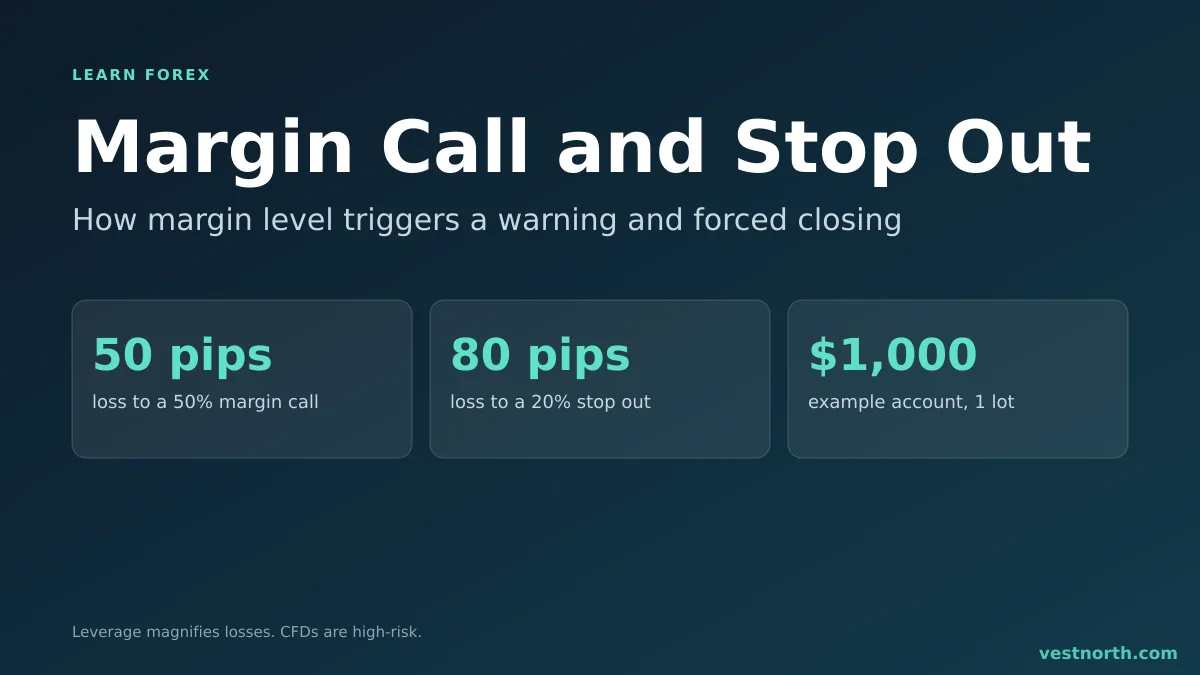
Margin level in numbers. Illustration based on the worked example in this article, using the Vantage levels reported in our review, October 2026.
How is margin level calculated?
Three numbers matter:
- Balance: your deposited money plus closed profits and losses.
- Equity: balance plus the floating profit or loss on open trades.
- Used margin: the amount the broker locks to keep your open trades going. See what leverage is for how it is set.
Margin level = equity ÷ used margin × 100
Our guide to what margin level is has more worked examples.
At the moment you open a trade with no profit or loss, equity equals balance. If you use all your balance as margin, the level starts at 100%. If you use a tenth of it, the level starts at 1,000%. The higher the number, the more room you have.
Margin call and stop out are two different lines
The margin call is the first line. Depending on the broker it can be an email, a platform alert or just a red status on the terminal. It does not close anything by itself.
The stop out is the second line, lower than the first. When the margin level touches it, the platform begins closing positions to free margin. Vantage’s help centre, as summarised in our Vantage review, says the largest losing position is closed first. AvaTrade’s help centre says the same, and our AvaTrade review reports a 50% stop out for retail accounts and 20% for professional and non-EU accounts.
Vantage’s help centre states the stop out plainly: it “is set at 20%” on all trading platforms (source).
Margin call and stop out levels by broker (October 2026)
Each broker sets its own lines, and some change them by entity or account. These are the levels each broker publishes for the accounts most global clients open, as of October 2026. Follow the link to the source before you rely on a figure.
| Broker | Margin call | Stop out | Source |
|---|---|---|---|
| Vantage (standard accounts) | 50% | 20% | stop out, margin call |
| Vantage Premium Unlimited | 30% | 0% | Vantage leverage guide |
| VT Markets (STP and ECN) | 50% | 20% (Client Agreement allows closing from 50%) | VT Markets leverage guide |
| FBS | 40% | 20% | FBS trading conditions |
| Exness (Standard, Standard Cent) | 60% | 0% | Exness help centre |
| Exness (Pro, Raw Spread, Zero) | 30% | 0% | Exness help centre |
| Axi (MT4/MT5, international) | Notice below 100% | 20% | Axi support |
| Titan FX | Email when equity falls below 90% of required margin | 20% | Titan FX help centre, Titan FX leverage guide |
| EBC (Standard, Professional) | not stated | 30% | EBC account types, EBC leverage guide, EBC review |
| AvaTrade MT4/MT5, retail | see the review | 50% | AvaTrade help centre, AvaTrade leverage guide |
| AvaTrade MT4/MT5, professional and non-EU | see the review | 20% | AvaTrade help centre |
Notes on the table:
- Exness’s 0% stop out has exceptions. Its help centre says the level rises to 100% during stock daily break hours and can be raised in times of increased market risk, and that clients of Exness (KE) Limited and Exness (JO) Limited have a 20% stop out (source). A 0% line means the platform waits until equity is gone, so the margin call is the only warning.
- Axi’s EU entity is different. Axi’s EU help centre (Solaris EMEA Ltd.) gives 50% for CySEC retail clients and 20% for professional clients (source). Axi’s own trading app uses 50% on Standard and Pro accounts, per our Axi review.
- AvaTrade’s help article is not consistent about professional accounts, and AvaTrade’s futures terms use different wording. Our AvaTrade review covers it. Treat 50% as the level to plan around.
- VT Markets gives 50% and 20% in its help centre, but its Client Agreement says it may start closing positions at 50%. Plan for the stricter one.
How to spot a broker with transparent margin call rules
A broker is transparent about margin when you can answer all five questions from its public documents before you open an account:
- Are both numbers published? A margin call level and a stop out level, as percentages, for your account type. Titan FX and Axi publish a stop out but describe the margin call as a notice, not a level.
- Do the help centre and the client agreement match? VT Markets is an example where they do not. The agreement is the binding document.
- Does the level change by entity or region? Exness and Axi both use different levels for some entities. Check the entity named on your account (see how to choose a forex broker).
- Which position closes first? Vantage and AvaTrade say the largest losing position closes first.
- Can the broker change the level? Most can, by notice. Exness says it can raise the stop out when market risk rises.
If any answer is missing, ask support in writing and keep the reply.
Worked example: $1,000 account, 1 lot of EUR/USD
Say you have $1,000, a 100:1 leverage limit and you open 1 standard lot (a position value of about $100,000, see what a lot is). To keep the arithmetic simple, assume the margin is $1,000, which uses your whole balance.
On EUR/USD one pip on 1 lot is worth about $10 (see what a pip is and forex pip value). With a 50% margin call and a 20% stop out:
| Price moves against you | Floating loss | Equity | Margin level | What happens |
|---|---|---|---|---|
| 0 pips | $0 | $1,000 | 100% | Nothing |
| 50 pips | $500 | $500 | 50% | Margin call |
| 80 pips | $800 | $200 | 20% | Stop out begins |
An 80-pip move on EUR/USD is routine over a few days. The account has no cushion because the position used every dollar of margin.
Now halve the position to 0.5 lot. Used margin falls to $500 and each pip is worth about $5. The margin call comes at equity of $250 (a $750 loss, 150 pips) and the stop out at equity of $100 (a $900 loss, 180 pips). The same account survives more than twice the move.
Margin call vs stop out at a glance
| Margin call | Stop out | |
|---|---|---|
| What it is | Warning that margin level reached the broker’s threshold | Automatic closing of positions |
| Margin level (example) | 50% | 20% |
| Closes trades? | Usually not | Yes, largest losing trade first on Vantage and AvaTrade |
| Can you act? | Yes: add funds or cut positions | Only before it triggers |
| Where it is defined | Help centre, sometimes only as a notice | Help centre and client agreement |
Second worked example: when does the margin call arrive?
A margin call is a level of equity. Work backwards from it and you get the number of pips you can absorb. Take a $2,000 account, 0.5 lot of EUR/USD (about $5 per pip) and used margin of $500, with a 50% margin call and a 20% stop out.
- Margin call equity: 50% of $500 = $250. Loss allowed: $2,000 - $250 = $1,750, which is 350 pips.
- Stop out equity: 20% of $500 = $100. Loss allowed: $1,900, which is 380 pips.
The price still has to travel 350 pips, so this trade is far from a call. Now open 2 lots on the same account, which needs about $2,000 of margin at 100:1 and gives $20 per pip. The margin call equity is $1,000, so a $1,000 loss (50 pips) triggers it, and stop out at $400 arrives after 80 pips. The account is the same and the position is four times bigger. The distance to the call fell from 350 pips to 50.
Figures assume a 100:1 limit and ignore spread, swap and commission, which all reduce equity slightly.
What to do when a margin call arrives
- Check your equity and used margin on the platform. Do not guess.
- Work out how far the price must move against you before the stop out, using the method above.
- Decide which option you prefer: reduce the position, close the weakest trade, or add funds you can afford to lose.
- If you reduce, the margin level jumps. Closing half the position halves used margin, and the level roughly doubles if equity is unchanged.
- Afterwards, reset your position size so the next trade starts with a wide gap to the margin call.
Why higher leverage makes this worse
Higher leverage lowers the margin needed per trade. That tempts traders to open a larger position, and a larger position means a dollar-per-pip figure that eats the equity faster. The levels do not move. Only the position size changes. A leverage cap such as 30:1 forces a bigger margin share, which is why capped accounts often stay further from the stop out for the same lot size.
What happens after a stop out?
The platform closes the largest losing trade first, and may close more if the margin level is still under the stop out line. You keep what is left of your equity. If prices gap over a news release, the closing price can be worse than the level you expected. In that case the account balance can go below zero. Whether the broker absorbs that loss depends on negative balance protection, which differs by entity. Our Vantage review reports that Vantage says it is not guaranteed at its international entities. Our AvaTrade review reports a negative balance adjustment for retail accounts, with professional accounts excluded.
How to stay away from a margin call
- Pick the lot size from the money you will risk on the stop loss, not from the largest position your margin allows. The lot size calculator does the sum, and lot size for beginners walks through it by hand.
- Put a stop loss on every trade so you decide the exit before the platform does.
- Keep free margin. Using more than a third of equity as margin leaves little room for a normal-sized move.
- Watch the combined exposure. Three trades on correlated pairs behave like one large trade. If you plan to offset a trade by hedging, check how your broker calculates margin on opposite positions first.
- Do not add money to a losing account just to dodge the stop out. That is the point where losses tend to grow.
Bottom line
A margin call is a warning and a stop out is the broker’s own risk control closing your trades. The numbers are set by your broker and entity, so read them before you trade. Size positions so that a normal market move leaves your margin level far above those lines. Only deposit money you can afford to lose. CFDs are complex, high-risk instruments.
Frequently asked questions
What is a margin call in forex?
It is a warning that your margin level has dropped to your broker's margin call threshold. Your trades usually stay open, but you are close to being closed out unless you add funds or reduce positions.
What is a stop out level?
It is the margin level at which the platform starts closing your positions automatically, normally the largest losing trade first. It is lower than the margin call level.
How is margin level calculated?
Margin level = equity ÷ used margin × 100. Equity is your balance plus floating profit or loss. Used margin is the amount locked up by your open trades.
What are typical margin call and stop out levels?
They differ by broker. As of October 2026 Vantage, VT Markets, FBS, Axi (international) and Titan FX list a 20% stop out, EBC lists 30%, AvaTrade retail 50%, and Exness 0% on most accounts. Check your own entity's terms.
What is the Vantage stop out level?
Vantage's help centre says the stop out level is 20% on all trading platforms, with a 50% margin call. Premium Unlimited accounts use a 30% margin call and a 0% stop out.
What does a 0% stop out mean?
The platform does not close positions until equity is used up. Exness lists 0% on most accounts, with exceptions such as 100% during stock daily break hours and 20% for its Kenya and Jordan entities.
Can I lose more than my balance after a stop out?
It can happen if the market gaps past your stop out level. Whether the broker covers that depends on negative balance protection, which varies by entity. Vantage says protection is not guaranteed at its international entities, while AvaTrade applies a negative balance adjustment to retail accounts.
How do I avoid a margin call?
Use smaller position sizes, keep a stop loss on every trade, and leave free margin unused. A position that locks up most of your balance leaves little room before the margin call.
Margin call vs stop out: what is the difference?
A margin call is a warning at a higher margin level, and a stop out is the automatic closing of trades at a lower level. On a 50% margin call and 20% stop out, you are warned at 50% and positions start closing at 20%.
How many pips until a margin call?
It depends on lot size and balance. In our example a $1,000 account with 1 lot of EUR/USD at $10 per pip reaches a 50% margin level after a 50-pip loss. With 0.5 lot the same level needs 150 pips.
What should I do when I get a margin call?
Either add funds, close part of a position, or close a trade. Each raises the margin level. Adding money to a losing account only helps if the position itself is sized sensibly.
Does a margin call close my trades?
Normally not by itself. It is a warning. Closing starts at the stop out level, though a broker's agreement may allow it to close positions earlier, as VT Markets' Client Agreement does.
Sources
- Vantage Help Centre: What is stop-out and how is it calculated?
- Vantage Help Centre: What is the margin call level?
- Exness Help Centre: Margin call and stop out levels by account type
- FBS: Trading conditions
- Axi Support: Is there a Margin Stop Out level?
- Axi EU Help Centre: What are margin stop out levels?
- Titan FX Help Centre: When Stop-out occurs?
- EBC Help Centre: What account types are available?
- AvaTrade Help Centre: What is a Margin Call?
Sources checked on October 19, 2026. Broker terms change often: confirm the current conditions on the broker's own site before you open an account.