Titan FX Minimum Deposit (2026): By Account and Payment Method
Advertiser disclosure: we may earn a commission if you open an account through our links. It does not affect our assessment. How we make money
Risk warning: CFDs are complex instruments and come with a high risk of losing money rapidly due to leverage. Most retail investor accounts lose money when trading CFDs. Consider whether you understand how CFDs work and whether you can afford to take the high risk of losing your money. Nothing on this site is financial advice.
Note for India: Titan FX is not authorised by the Reserve Bank of India to offer forex trading to Indian residents. Under FEMA, Indian residents may trade forex only in permitted currency pairs, through RBI-authorised persons, recognised Indian exchanges or RBI-authorised platforms. If you open an account with an offshore broker, you do so at your own risk. RBI Alert List
Titan FX does not accept clients from your country, so we don't link to it here. See other brokers, and always check that a broker is authorised where you live.
Short answer: Titan FX’s help centre says “the initial deposit amount we require is 200 USD or equivalent” (source), and its trading conditions page says the same (source). Its Zero Micro page says there is no minimum deposit (source). Each payment method also sets its own floor, from 1 USD on Apple Pay to 50 USD by international bank transfer. The pages do not agree, so confirm your figure in the Client Cabinet.
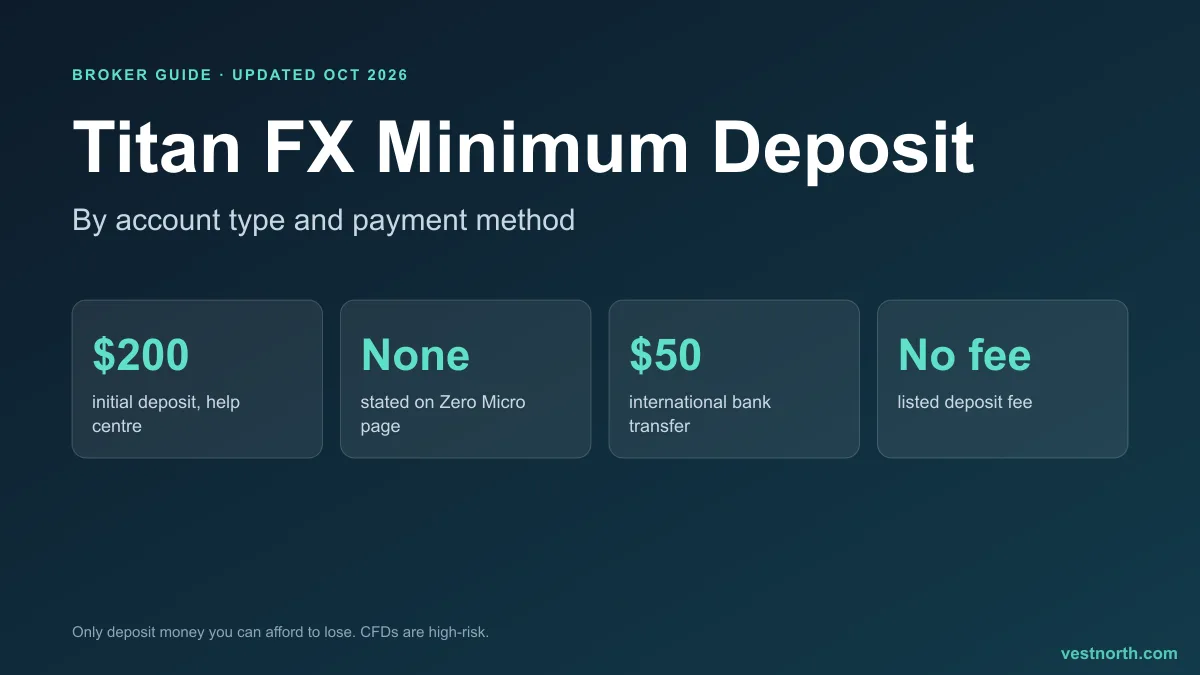 Titan FX minimum deposit figures. Source: Titan FX help centre and website, October 2026.
Titan FX minimum deposit by account
Titan FX has three live accounts: Zero Standard, Zero Blade and Zero Micro. Our full Titan FX review covers how they differ. Here is what Titan FX says about the starting amount:
| Source | What it says | Date or note |
|---|---|---|
| Help centre, “What is the minimum margin for trading?” | “The initial deposit amount we require is 200 USD or equivalent” | Updated 30 March 2026 |
| Trading conditions page | “a low minimum deposit of $200 to open your first account” | Undated |
| Zero Micro page | “No minimum deposit, trade FX, Gold, Silver and Bitcoin with micro lots” | Undated |
| Accounts overview | “no minimum initial deposit” for Micro, and “no account opening or maintenance fees” on all accounts | Undated |
Read together, the help centre and conditions page give 200 USD as the general figure, and the Micro pages give none for that account. Titan FX does not explain the gap on the pages we read. One plausible reading is that the 200 USD applies to Standard and Blade, but the help centre answer does not say that, so we cannot state it as fact. The Client Cabinet should show the exact amount when you pick an account type.
The 200 USD is also not the only threshold you meet. Titan FX’s promotions have their own net deposit requirements, covered below.
Minimum deposit by payment method
Titan FX publishes method limits in two places: the funding page and the help centre’s Deposit Methods article, updated 20 April 2026. We show both where they differ.
| Method | Minimum | Maximum per transaction | Fee | Notes |
|---|---|---|---|---|
| Visa and Mastercard | 0 USD (help centre) | 100,000 USD | None | JCB is listed at 20 to 5,000 USD |
| Apple Pay | 1 USD | 80,000 USD | None | Visa or Mastercard through Apple Pay |
| Skrill | 10 USD | 5,000 USD | None | Not available to residents of Japan |
| Neteller | 10 USD | 5,000 USD | None | Not available to residents of Japan |
| Sticpay | 30 USD | 100,000 USD (help centre) | None | Not available in the EEA or UK per the funding page |
| International bank transfer | 50 USD | 500,000 USD | None | Not available to clients in Malaysia |
| Cryptocurrency | 40 USD (help centre) | 50,000 USD | None | USD, JPY, EUR and SGD accounts only |
| Local Japanese bank transfer | 5,000 JPY | 10,000,000 JPY | Bank fees may apply | Japan only |
| Peska | 5 USD | 100,000 USD | None | Japan only per the help centre |
| DuitNow QR and FPX | About 15 to 20 USD | Varies | None | Malaysia only |
Sources: funding page and Deposit Methods. Titan FX says the limits “may vary and are subject to change”. Where a limit is shown only in the help centre, we mark it; the funding page leaves it out.
Two of these floors are below the 200 USD initial deposit. A 1 USD Apple Pay deposit, for example, is a valid payment, but it would not meet a 200 USD account requirement if that applies to your account. Treat the method minimum as the lowest amount the payment channel accepts, and the 200 USD as the amount the broker asks for to start trading.
What a Titan FX deposit costs
Titan FX says it charges no deposit fee on any method. The funding page repeats “No deposit or withdrawal fees” for cards, Sticpay, bitwallet and bank transfer, and “No deposit fee” for the wallets and Apple Pay. Third parties are a different matter:
- Cards: the card issuer may add a usage fee. The help centre says Titan FX will cover that fee if you contact support (source). The statement name can differ between deposits because Titan FX uses several payment providers.
- Bank transfers: “Bank transaction fees may apply”, and international transfers can carry intermediary charges.
- Skrill and Neteller: the wallet may charge its own fees. Other currencies are converted to US dollars at the wallet’s rate.
- Crypto: “Cryptocurrency exchange may charge network fees.” The sender pays gas or miner fees (source).
Titan FX accepts deposits in US dollars, Japanese yen, Singapore dollars and euros by card, and base currencies on the accounts are USD, EUR, JPY and SGD. If you pay in a different currency, a conversion applies and the exchange rate is set by the provider.
Deposit conditions that matter more than the minimum
Cards must be registered. To deposit by card you first register an image of the card through Titan FX’s automatic authentication, with the first 6 and last 4 digits visible and the CVV hidden (source). Prepaid and gift cards cannot be used for Apple Pay.
Third-party deposits are refused. The Funding and Withdrawal Terms say refunds are issued when funds cannot be accepted because of “third-party deposits or unidentified sources of funds” (source). Pay from a source in your own name.
Your deposit sets how you can withdraw. Titan FX’s anti-money-laundering rules require withdrawals to go back to the account you funded, up to the amount deposited. Only profit above your deposits can be sent to another method (source). Choose a deposit method you can also withdraw to.
Crypto timing differs by page. The Funding and Withdrawal Terms say a fixed exchange rate applies for 15 minutes for each crypto deposit request, after which the spot rate applies. The help centre article on crypto fees says a 30-minute fixed rate applies to BTC, ETH, LTC, BCH and USDT, for amounts under 4,000 EUR, when the funds arrive within 30 minutes (source). The Terms are dated June 2026 and the help article March 2026, so the shorter window is the newer. Send the transfer promptly either way. A new one-time wallet address is generated for every deposit, and the token and network must match, or funds can be lost.
Verification can limit your options. The help centre says that if you have not completed identity verification, the cryptocurrencies available for deposit are limited (source).
Promotions with their own deposit minimums
As of October 2026 Titan FX’s promotions page lists two offers tied to deposit size (source):
| Promotion | Minimum net deposit | What you get |
|---|---|---|
| First Trade Cashback (code FIRST50) | 100 USD | 5 USD per 100,000 USD traded, up to 50 USD. Only trades held at least 2 minutes count |
| Titan Points Reward (code POINT1000) | 200 USD | 1,000 points per 100,000 USD traded |
The cashback page says to redeem the promo code within 7 days of opening your first live account and before any deposit or trade, then make the net deposit and trade at least 100,000 USD of value (source). These are rebates that depend on trading volume. Do not size your deposit around them, and do not trade more than you planned to chase a rebate.
How far does the minimum go?
A small deposit limits position size more than most beginners expect. The Standard and Blade smallest trade is 0.01 lot, which is 1,000 units of the base currency. The Micro account’s smallest FX trade is 0.1 micro lot, or 100 units (source). By the general margin formula, required margin is trade value divided by leverage, so 1,000 units at 1000:1 needs about 1 unit of base currency in margin. That is arithmetic, not a Titan FX quote, and the real margin depends on the pair and the platform’s margin schedule.
The danger sits on the other side of the same formula. Titan FX says a stop out occurs when the margin level falls to 20% (source). With high leverage, a small account has a thin cushion and can be closed out quickly by a short price move. Use our lot size calculator to size a trade from the amount you can afford to lose, and read margin call and stop out before you fund the account.
Minimum withdrawal for comparison
You will want to know what it takes to take money back out. The help centre’s Withdrawal Methods article, updated 20 April 2026, lists minimums of 2 USD on Sticpay, 1 USD on Skrill, 10 USD on Neteller and international bank transfer, and 80 USD on cryptocurrency, with processing normally within 1 business day for most methods (source). Crypto withdrawals are typically processed within 48 hours after internal review. Withdrawals are fee free, with one exception: a 4% fee applies if no trades are made on the account.
Where Titan FX is not available
Titan FX’s help centre lists the United States, Australia, New Zealand, Vanuatu, Pakistan, Sri Lanka and other countries as unsupported, and says residents or nationals of those countries cannot open an account (source). A low deposit does not change that. Titan FX is an offshore broker, so read the regulation and protection details in our Titan FX review before you deposit.
Bottom line
Titan FX asks for 200 USD to start according to its help centre and trading conditions page, while its Micro page says there is no minimum, and the payment methods set floors between 1 and 50 USD. Deposits carry no Titan FX fee, though banks, card issuers, wallets and crypto networks can charge their own.
Confirm the amount for your account type and payment method in the Client Cabinet, pay from a source in your own name, and choose a method you can also withdraw to. Only deposit money you can afford to lose, and remember that high leverage can use up a small balance fast.
Note for India: Titan FX is not authorised by the Reserve Bank of India to offer forex trading to Indian residents. Under FEMA, Indian residents may trade forex only in permitted currency pairs, through RBI-authorised persons, recognised Indian exchanges or RBI-authorised platforms. If you open an account with an offshore broker, you do so at your own risk. RBI Alert List
Titan FX does not accept clients from your country, so we don't link to it here. See other brokers, and always check that a broker is authorised where you live.
Note for India: Titan FX is not authorised by the Reserve Bank of India to offer forex trading to Indian residents. Under FEMA, Indian residents may trade forex only in permitted currency pairs, through RBI-authorised persons, recognised Indian exchanges or RBI-authorised platforms. If you open an account with an offshore broker, you do so at your own risk. RBI Alert List
Titan FX does not accept clients from your country, so we don't link to it here. See other brokers, and always check that a broker is authorised where you live.
Frequently asked questions
What is the Titan FX minimum deposit?
The help centre says the initial deposit amount required is 200 USD or equivalent, and the trading conditions page repeats a minimum deposit of $200 to open your first account. The Zero Micro page, however, says there is no minimum deposit.
Is there a minimum deposit for the Titan FX Micro account?
The Zero Micro page says 'No minimum deposit'. The help centre's general answer is 200 USD, so the two do not match. Confirm in the Client Cabinet before you fund the account.
What is the minimum deposit by card at Titan FX?
The help centre's Deposit Methods table lists a minimum of 0 USD for Visa and Mastercard, with a maximum of 100,000 USD per transaction. Apple Pay is listed at 1 USD. Cards must be registered first.
What is the minimum bank transfer deposit at Titan FX?
50 USD or equivalent per transaction by international bank transfer, with a maximum of 500,000 USD per transaction. The help centre says it can take up to 7 days, while the funding page says instant once Titan FX confirms receipt.
What is the minimum crypto deposit at Titan FX?
The help centre lists 40 USD with a maximum of 50,000 USD. Titan FX does not charge a fee, but you pay the network fee. Crypto deposits are available only for USD, JPY, EUR and SGD accounts.
Does Titan FX charge a deposit fee?
Titan FX says it charges no deposit fee on any listed method. Your bank, card issuer, wallet provider or the crypto network can still charge their own fees.
Do the Titan FX promotions need a bigger deposit?
Yes. The first-trade cashback needs a net deposit of at least 100 USD and the Titan Points reward needs a minimum net deposit of 200 USD. Both are volume-linked rebates, so you can skip them.
Sources
- Titan FX Help Center: What is the minimum margin for trading?
- Titan FX: Trading conditions
- Titan FX: Zero Micro account
- Titan FX: Trading accounts
- Titan FX Help Center: Deposit Methods
- Titan FX: Funding
- Titan FX: Withdrawal
- Titan FX: Funding and Withdrawal Terms and Conditions, updated June 2026 (PDF)
- Titan FX Help Center: Is there a charge for credit card deposits?
- Titan FX Help Center: Do I need to register my card before making a deposit?
- Titan FX Help Center: Apple Pay Deposits
- Titan FX Help Center: Cryptocurrency deposit
- Titan FX Help Center: Is there a fee to deposit via Cryptocurrency?
- Titan FX Help Center: What is a Micro Account?
- Titan FX Help Center: Withdrawal Methods
- Titan FX Help Center: Unsupported Countries
- Titan FX: Promotions
- Titan FX: First trade cashback terms
Sources checked on October 7, 2026. Broker terms change often: confirm the current conditions on the broker's own site before you open an account.